For my music magazine i decided to try and do something original. I looked into various music magazine and noticed the large number of Pop/Rock magazines which seemed popular genres to pick (Q, NME, Kerrang!, Classic Rock, etc). I decided against this as another one of these magazines wouldn't stand out, whereas originality would. My idea was to not focus on 1 genre that the audience already knows, but to focus on genres the audience are interested in looking into. The idea was to help young teenagers in discovering what genres they actually like by providing them with the information they need to look into each genre.
The idea behind this issue was classic albums. The front cover picture will be a pile of classic albums from a wide range of genres to show the sheer amount of great albums out there and the wide range of options. The double page spread is going take classic albums from a genre (depending on results from questionnaire) and analyse them. I have design ideas in my head for this and am sure i can impliment them.
The CD will contine the idea of multiple genres, giving the audience a chance to hear samples of some classic albums in a wide range of genres. However the key focus will be on whatever genre comes out top in the questionnaire.
Wednesday, 8 December 2010

Student Magazine Part 2
I have now taken photos of various things around the studio at school and used them in my magazine, I took several photos and these were the ones which came out best:


A pair of headphones used in the Contents page.
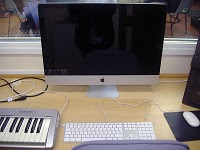
The iMac used on the front cover as a background image.

A speaker not used in the magazine.

Another shot of the iMac, with Keyboard, Mouse and MIDI Keyboard in shot, used on Contents page.

An SM58 Microphone, used on the contents page.

An Audio Technica Condenser Microphone, used on the contents page.

The front cover. The title 'Student Productions' is Dark Blue, used to create a distinctive colour scheme which stands out from other magazines. The Blue text box points out the main subject in this month's issue, Multi-track ideas. A big issue for Music Technology students (from experience).

The contents page, note the use of Dark Blue again, continuing the distinctive theme.
Overall the images create the impression that it is very technologically involved. The contents page was inspired heavily by Computer Music magazine. I thought about the number of pages to each section of the magazine and spaced them out over a sensible amount, considering the size of each section. I also added a small text box to the bottom of the page, saying which page the reader is currently on with the magazine's name.
I didn't have much time to piece everything together as I joined the course late, but have learned essential skills in putting together a good, stylish magazine, which will come in very helpful in my Coursework.
Student Magazine Part 1
I started off by looking at the subjects i am currently doing. The one that stood out the most was Music Technology. So i then studied a well known Music Production magazine called 'Computer Music'. They have built up a highly respectible reputation over the years in production and engineering circles.
My next step was to decide what content to include, and what was relevant to the course at hand. I thought about where the course i was doing became difficult and where i could use some professional advice. I also thought about what students studying the subject would be intersted in reading about, such as reviews, previews and interviews.
When i had all these ideas written down i looked at how i would design the front cover. We have a studio in school which i thought would be a good idea to use for a front cover photo. I thought about getting an action shot of 2/3 core elements of music technology - Capture (person playing guitar whilst another positions a microphone) and Mixing (a person on the computer mixing the parts together). I also wanted to include a person on the side, watching the producer and learning, just like the target audience. Only students were to be used in the photo as the target audience is students of this subject, it puts them in the spotlight.
I then went on to design the layout of the front cover on Microsoft Publisher. Designing features such as position of title, subtitle (tagline), price (£2.99 - a realistic price for students), barcode (http://ceoworld.biz/ceo/wp-content/uploads/2009/11/barcode.png) and various text boxes containing information relating to the magazine's contents. I thought about what songs other people had used in their Multi Track Recording Task for AS Level and put these on the front cover as suggestions.
I used WordArt for Titles and Subtitles across the page and typed in Information such as Price and Magazine's features.
My next step was to decide what content to include, and what was relevant to the course at hand. I thought about where the course i was doing became difficult and where i could use some professional advice. I also thought about what students studying the subject would be intersted in reading about, such as reviews, previews and interviews.
When i had all these ideas written down i looked at how i would design the front cover. We have a studio in school which i thought would be a good idea to use for a front cover photo. I thought about getting an action shot of 2/3 core elements of music technology - Capture (person playing guitar whilst another positions a microphone) and Mixing (a person on the computer mixing the parts together). I also wanted to include a person on the side, watching the producer and learning, just like the target audience. Only students were to be used in the photo as the target audience is students of this subject, it puts them in the spotlight.
I then went on to design the layout of the front cover on Microsoft Publisher. Designing features such as position of title, subtitle (tagline), price (£2.99 - a realistic price for students), barcode (http://ceoworld.biz/ceo/wp-content/uploads/2009/11/barcode.png) and various text boxes containing information relating to the magazine's contents. I thought about what songs other people had used in their Multi Track Recording Task for AS Level and put these on the front cover as suggestions.

I used WordArt for Titles and Subtitles across the page and typed in Information such as Price and Magazine's features.
Subscribe to:
Posts (Atom)